MrDoc Deployment Guide
Simple Run
Deployment guide
Deploy MrDoc with Docker (recommended)
Docker image deployment
Deploy with Docker Compose
Manage Docker containers
Deploy MrDoc on Linux
Deploy MrDoc with Nginx + uWSGI
One-click deployment script (no longer maintained)
Baota Panel "Python Project Manager 1.9" deployment
Official Docker image deployment
Deploy MrDoc on Windows
Deploy with Waitress
Windows deployment panel
NAS deployment
Deploying on Zspace NAS
Feiniu FnOS deployment
Update upgrade notes - Open Source Edition
Update upgrade notes - Pro edition
System dependency library description
Migrating native deployment to Docker deployment
Configuration guide
Custom database configuration
Configure PDF generation for collections
Full-text search configuration
Using MySQL database with Docker
Configuring MySQL database to support emoji
Host static file resources with Nginx
Enable SSL with Nginx / Set up HTTPS
Configure reverse proxy/bind domain with Nginx
Nginx handling local video playback
Custom uWSGI configuration
Configuration file description
Data security
Site data backup/site migration
Professional data export and import
Open source data export and import
Data migration from open source to professional edition
Frequently asked questions
What to do if SQLite3 version error occurs?
What if the admin forgets the password?
Error: SyntaxError: invalid syntax
MySQLdb._exceptions.OperationalError: (1366, "Incorrect string value:")
Baota Panel "Python Project Manager" virtual environment usage issues.
View logs/log storage location
403 errors on POST/PUT requests for login, publish, upload, and edit under Nginx/HTTPS
What if I can't access the backend after switching the default login method?
Troubleshooting
Tip sponsorship records
MrDoc deployment server configuration recommendations
Powered by MrDoc Pro
-
+
home
Update upgrade notes - Open Source Edition
# Update and Upgrade Instructions - Open Source Edition MrDoc is in continuous development and iteration, with a new version released almost every month, bringing numerous bug fixes, security vulnerability fixes, feature optimizations, and new features. If the version of MrDoc you are using is not the latest, you can upgrade and update it as follows. >i Docker is officially recommended for deployment: > - Official Docker image deployment documentation: https://doc.mrdoc.pro/doc/3958/ > - Native deployment to Docker deployment documentation: https://doc.mrdoc.pro/doc/45499/ ## Must-read before proceeding! Check the version update notes It is strongly recommended that before performing a version upgrade, especially when upgrading across multiple versions, ==you must carefully check the update notes for each version== to understand whether the system environment/Docker image needs to be upgraded. - Open source edition version update notes: [https://doc.mrdoc.pro/doc/4029/](https://doc.mrdoc.pro/doc/4029/ "https://doc.mrdoc.pro/doc/4029/") - Pro edition version update notes: [https://doc.mrdoc.pro/doc/4030/](https://doc.mrdoc.pro/doc/4030/ "https://doc.mrdoc.pro/doc/4030/") ## Must-read for intranet deployment! If the code was not pulled via git (common in intranet environments or NAS environments), then the code retrieval step in the update and upgrade operation is as follows: - Back up the configuration directory `/config` and the media file directory `/media`; - Download the new version code and overwrite the old version code; - Overwrite the backed-up configuration and media file directories into the new version code directory; ## Prerequisite! Data backup >d Be sure to back up data before updating and upgrading to avoid data loss caused by upgrade failure. See: https://doc.mrdoc.pro/doc/45787/ ## Upgrade for source code deployment If you deployed MrDoc using its source code (Linux, Windows), you can upgrade by following these steps: > d If you are using a virtual environment, activate/enter the virtual environment first!!! > If you are using a virtual environment, activate/enter the virtual environment first!!! > If you are using a virtual environment, activate/enter the virtual environment first!!! 1. In the MrDoc project directory (the directory where the manage.py file is located), pull the latest code: ``` git fetch --all && git reset --hard origin/master && git pull ``` 2. Update dependency libraries: ``` pip install -r requirements.txt ``` 3. Generate database migrations: ``` python manage.py makemigrations ``` 4. Execute database migrations: ``` python manage.py migrate ``` ## Upgrade for official Docker image deployment See: [Docker deployment](https://doc.mrdoc.pro/doc/3958/) >d **Important note** > > Please refer to the version [update records](#h2-查看版本更新说明) to understand whether the Docker image needs to be upgraded. If the Docker image does not need to be upgraded, you can proceed directly as described below; if there is a Docker image update, be sure to upgrade according to [Docker image upgrade](https://doc.mrdoc.pro/doc/3958/#h2-七、升级镜像) 1. In the MrDoc project directory on the host machine/outside the container (the directory where the manage.py file is located), pull the latest code ``` git fetch --all && git reset --hard origin/master && git pull ``` 2. Restart the Docker container ``` docker restart mrdoc ``` ## Upgrade for Docker Compose deployment Simply run the `docker-update.sh` script in the project directory. ## Upgrade for Jonnyan Docker deployment For MrDoc deployed via Jonnyan's `Docker image`, refer to the **"Upgrade"** section in its deployment guide [《Docker 部署 mrdoc》](https://www.mrdoc.fun/doc/18/). ## Upgrade for Baota Panel "Python Project Manager" 1.9 deployment Step one, pull the latest code: 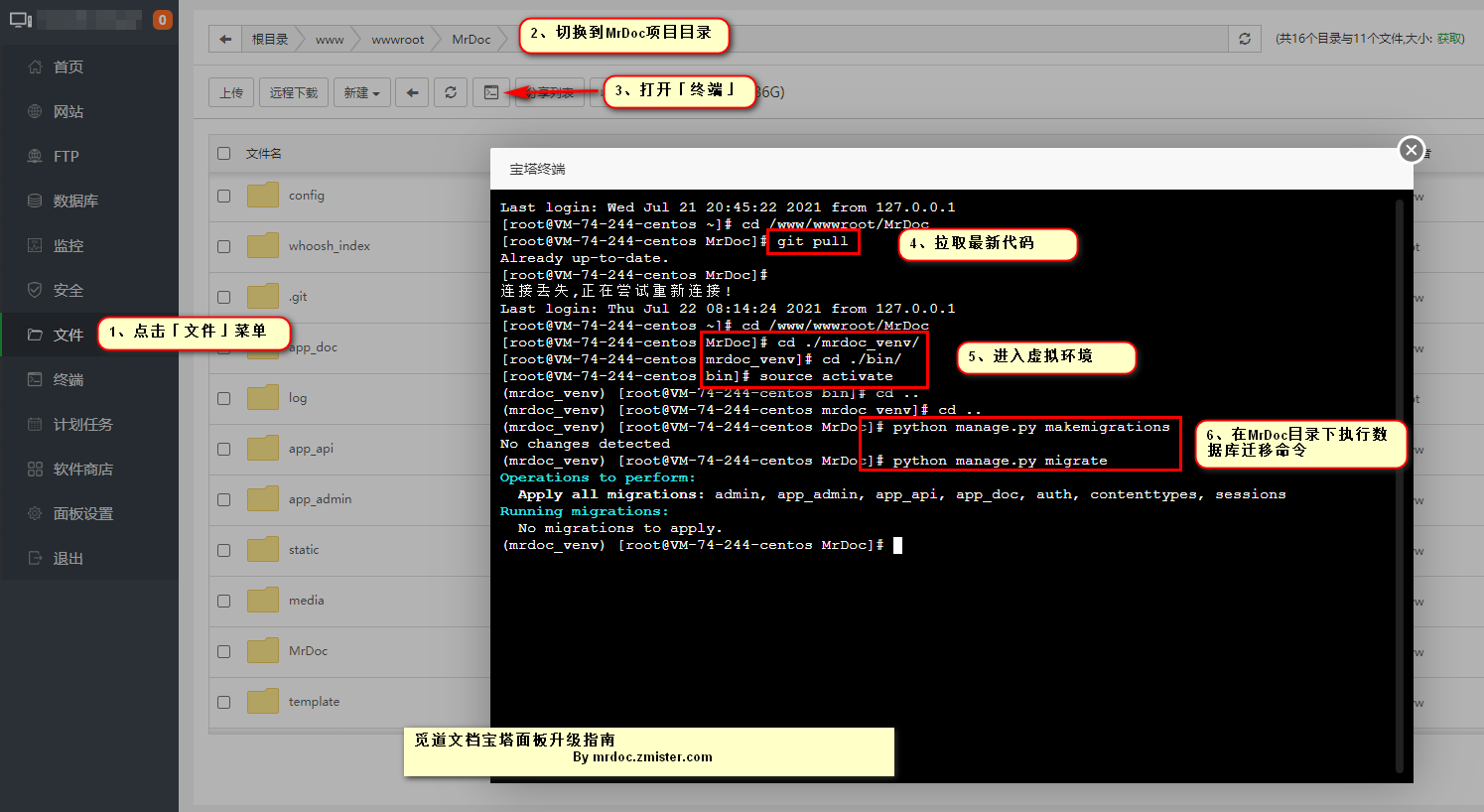 Step two, update dependency libraries: ``` pip install -r requirements.txt ``` Step three: execute database migrations: ``` python manage.py makemigrations python manage.py migrate ``` Step four, restart MrDoc in "Python Project Manager": 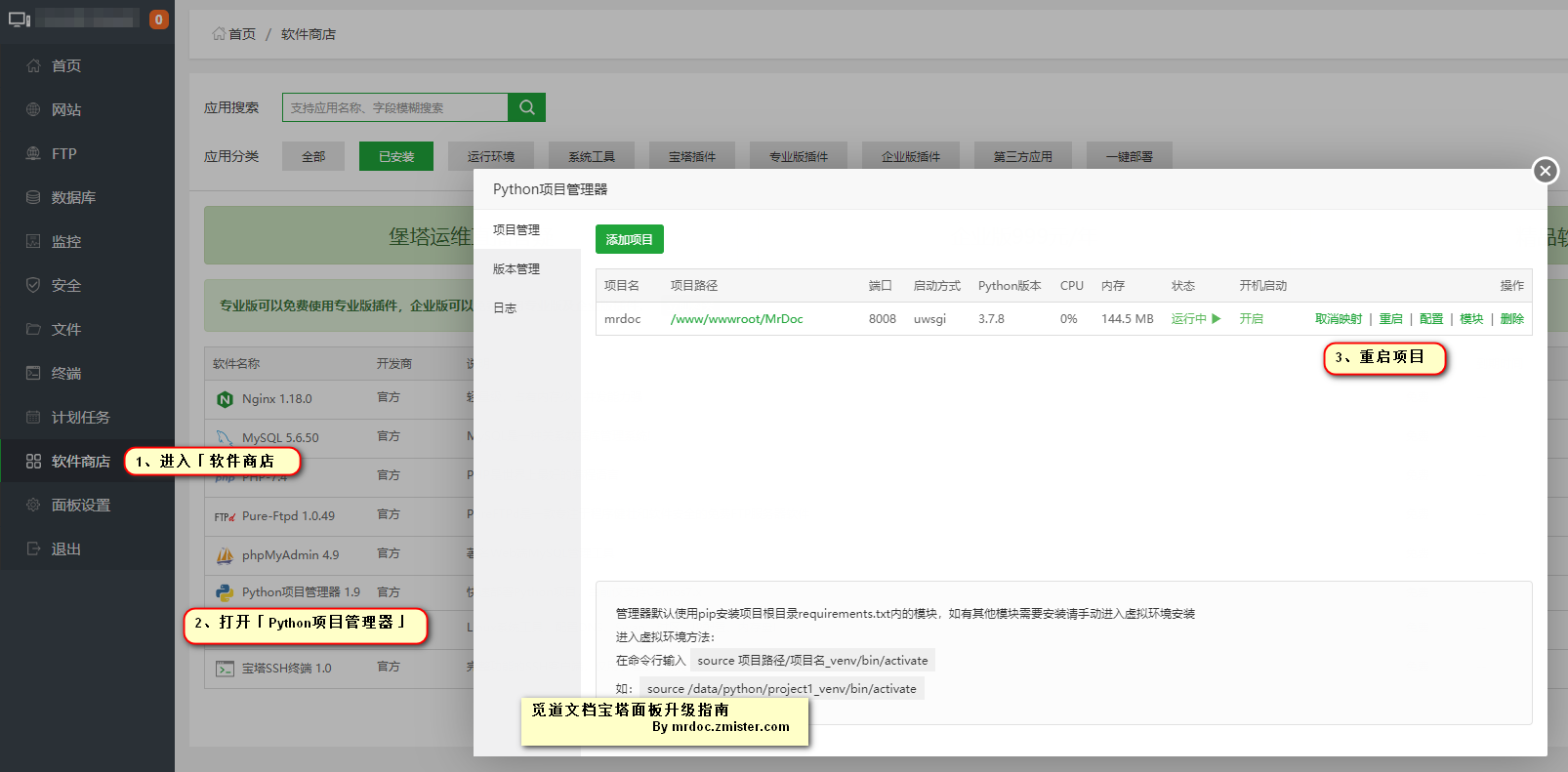 ## Upgrade for Baota Panel "Python Project Manager" 2.x deployment >d Version 2.x of the Baota Panel "Python Project Manager" no longer requires activating a virtual environment, but commands must be executed directly using the `pip`, `python`, etc. under the virtual environment. When executing `pip`, `python` and other commands, you need to enter the complete command path, for example `/www/wwwroot/MrDoc/asdf3s54sd235a3sd56as3d_venv/bin/pip` Enter the MrDoc code directory. 1. In the MrDoc project directory (the directory where the manage.py file is located), pull the latest code: ``` git fetch --all && git reset --hard origin/master && git pull ``` 2. Update dependency libraries: ``` /虚拟环境路径/bin/pip install -r requirements.txt ``` 3. Generate database migrations: ``` /虚拟环境路径/bin/python manage.py makemigrations ``` 4. Execute database migrations: ``` /虚拟环境路径/bin/python manage.py migrate ``` Step three, restart MrDoc in "Python Project Manager":  ## Upgrade for one-click deployment script deployment 1. Update the code Open source edition: ``` mrdoc --update ``` Pro edition: ``` mrdoc --update pro ``` 2. Restart Open source edition: ``` mrdoc --restart ``` Pro edition: ``` mrdoc --restart pro ``` @[frag](id=8 title=专业版引导 - 通用类)
mrdoc
Sept. 29, 2026, 2:56 p.m.
Forward
Favorites
Last
Next
Scan the QR Code
Copy link
Scan the QR code to share.
Copy link
share
link
type
password
Update password
Validity period
Markdown file
Word document
PDF document (print)