MrDoc Deployment Guide
Simple Run
Deployment guide
Deploy MrDoc with Docker (recommended)
Docker image deployment
Deploy with Docker Compose
Manage Docker containers
Deploy MrDoc on Linux
Deploy MrDoc with Nginx + uWSGI
One-click deployment script (no longer maintained)
Baota Panel "Python Project Manager 1.9" deployment
Official Docker image deployment
Deploy MrDoc on Windows
Deploy with Waitress
Windows deployment panel
NAS deployment
Deploying on Zspace NAS
Feiniu FnOS deployment
Update upgrade notes - Open Source Edition
Update upgrade notes - Pro edition
System dependency library description
Migrating native deployment to Docker deployment
Configuration guide
Custom database configuration
Configure PDF generation for collections
Full-text search configuration
Using MySQL database with Docker
Configuring MySQL database to support emoji
Host static file resources with Nginx
Enable SSL with Nginx / Set up HTTPS
Configure reverse proxy/bind domain with Nginx
Nginx handling local video playback
Custom uWSGI configuration
Configuration file description
Data security
Site data backup/site migration
Professional data export and import
Open source data export and import
Data migration from open source to professional edition
Frequently asked questions
What to do if SQLite3 version error occurs?
What if the admin forgets the password?
Error: SyntaxError: invalid syntax
MySQLdb._exceptions.OperationalError: (1366, "Incorrect string value:")
Baota Panel "Python Project Manager" virtual environment usage issues.
View logs/log storage location
403 errors on POST/PUT requests for login, publish, upload, and edit under Nginx/HTTPS
What if I can't access the backend after switching the default login method?
Troubleshooting
Tip sponsorship records
MrDoc deployment server configuration recommendations
Powered by MrDoc Pro
-
+
home
Configure reverse proxy/bind domain with Nginx
# Using Nginx to Configure a Reverse Proxy / Bind a Domain After running MrDoc with uWSGI/Gunicorn/Docker, MrDoc can be accessed directly in the form of `IP:port`. However, we recommend using Nginx for reverse proxying. You can add the following `server` section to the http block in the `nginx.conf` file and reload the configuration: ```bash server { listen your_port; server_name your_domain_or_IP; location / { proxy_pass http://127.0.0.1:10086; proxy_set_header Host $host; proxy_set_header X-Real-IP $remote_addr; proxy_set_header X-Forwarded-For $proxy_add_x_forwarded_for; proxy_set_header REMOTE-HOST $remote_addr; proxy_set_header X-Forwarded-Proto $scheme; #Set Nginx Cache add_header Cache-Control no-cache; add_header X-Cache $upstream_cache_status; proxy_ignore_headers Set-Cookie Cache-Control expires; proxy_read_timeout 300; # Streaming video processing proxy_set_header Range $http_range; proxy_set_header If-Range $http_if_range; add_header X-Accel-Buffering no; } } ``` ## Baota Panel Operations ### 1. Add a Website  ### 2. Add a Reverse Proxy 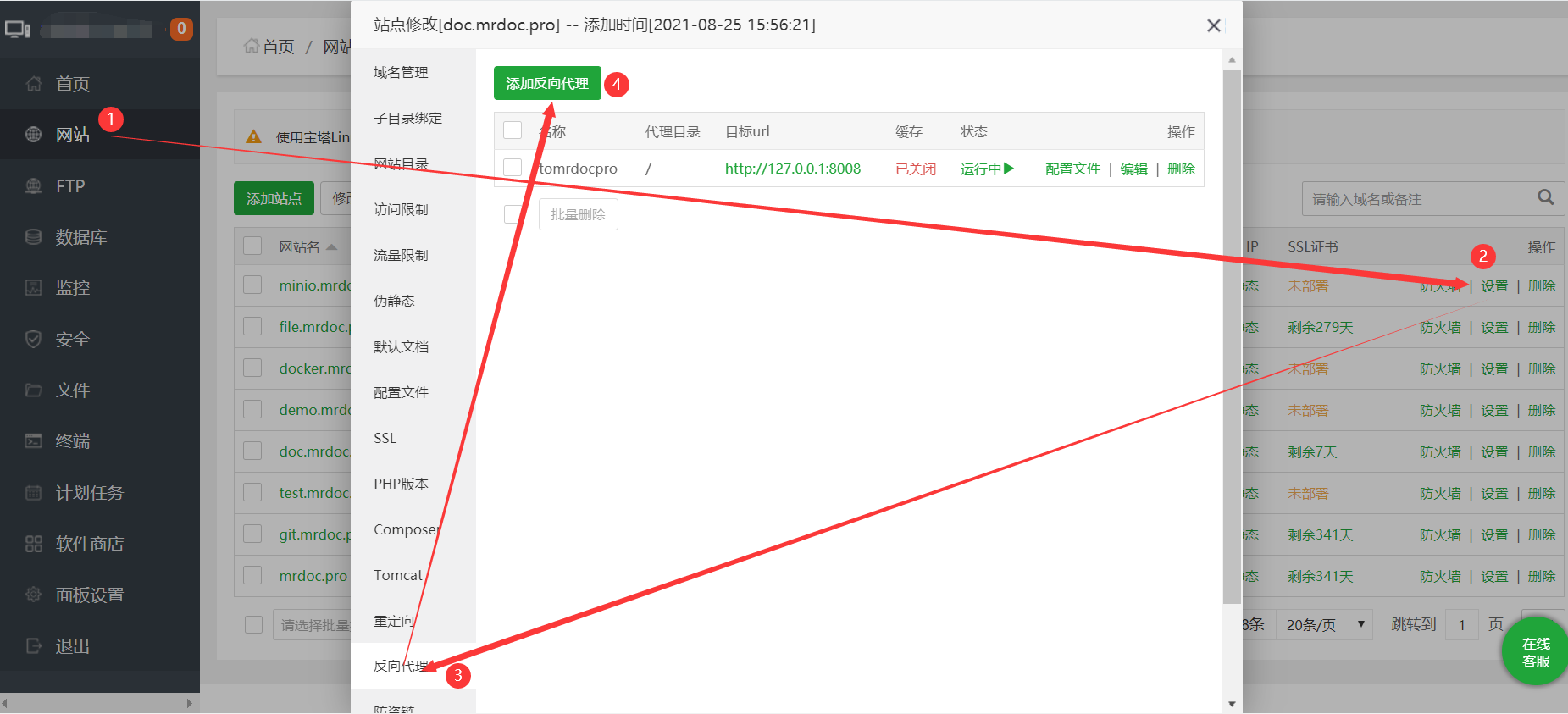 ### 3. Configure the Reverse Proxy After adding the reverse proxy, we recommend that you continue to add the following configuration in the `location / {}` section of the configuration file: ``` proxy_set_header Host $host; proxy_set_header X-Real-IP $remote_addr; proxy_set_header X-Forwarded-For $proxy_add_x_forwarded_for; proxy_set_header REMOTE-HOST $remote_addr; proxy_set_header X-Forwarded-Proto $scheme; add_header X-Cache $upstream_cache_status; proxy_set_header Range $http_range; proxy_set_header If-Range $http_if_range; # Streaming video processing proxy_set_header Range $http_range; proxy_set_header If-Range $http_if_range; add_header X-Accel-Buffering no; ``` The functions of the relevant configurations: - `proxy_set_header Host $host;`: Ensures that when MrDoc receives a request, it can see the domain requested by the client. - `proxy_set_header X-Real-IP $remote_addr;`: Passes the client's real IP to MrDoc. - `proxy_set_header X-Forwarded-For $proxy_add_x_forwarded_for;`: Records the list of IPs through which the client passed via the proxy. - `proxy_set_header X-Forwarded-Proto $scheme;`: Passes the protocol used by the client (HTTP or HTTPS) to MrDoc.
mrdoc
Sept. 29, 2026, 6:35 p.m.
Forward
Favorites
Last
Next
Scan the QR Code
Copy link
Scan the QR code to share.
Copy link
share
link
type
password
Update password
Validity period
Markdown file
Word document
PDF document (print)