MrDoc Deployment Guide
Simple Run
Deployment guide
Deploy MrDoc with Docker (recommended)
Docker image deployment
Deploy with Docker Compose
Manage Docker containers
Deploy MrDoc on Linux
Deploy MrDoc with Nginx + uWSGI
One-click deployment script (no longer maintained)
Baota Panel "Python Project Manager 1.9" deployment
Official Docker image deployment
Deploy MrDoc on Windows
Deploy with Waitress
Windows deployment panel
NAS deployment
Deploying on Zspace NAS
Feiniu FnOS deployment
Update upgrade notes - Open Source Edition
Update upgrade notes - Pro edition
System dependency library description
Migrating native deployment to Docker deployment
Configuration guide
Custom database configuration
Configure PDF generation for collections
Full-text search configuration
Using MySQL database with Docker
Configuring MySQL database to support emoji
Host static file resources with Nginx
Enable SSL with Nginx / Set up HTTPS
Configure reverse proxy/bind domain with Nginx
Nginx handling local video playback
Custom uWSGI configuration
Configuration file description
Data security
Site data backup/site migration
Professional data export and import
Open source data export and import
Data migration from open source to professional edition
Frequently asked questions
What to do if SQLite3 version error occurs?
What if the admin forgets the password?
Error: SyntaxError: invalid syntax
MySQLdb._exceptions.OperationalError: (1366, "Incorrect string value:")
Baota Panel "Python Project Manager" virtual environment usage issues.
View logs/log storage location
403 errors on POST/PUT requests for login, publish, upload, and edit under Nginx/HTTPS
What if I can't access the backend after switching the default login method?
Troubleshooting
Tip sponsorship records
MrDoc deployment server configuration recommendations
Powered by MrDoc Pro
-
+
home
Update upgrade notes - Pro edition
# Update and Upgrade Instructions - Pro Edition # MrDoc Pro Update Instructions >i Starting from version 1.6.7, MrDoc Pro is delivered as a "customer-exclusive source code package (zip)". > The update consists of 4 core steps: **download and extract → stop container → copy old config/media to overwrite the new version → start container**. Portal download address: https://portal.mrdoc.pro/ ### Differences from the previous update method | Comparison | Before 1.6.7 | 1.6.7 and later | | ------------------- | ------------------------- | ---------------------------------------- | | Obtain new code | Pull via `git pull` | Download the new ZIP source package | | Update code | Pull via Git commands | Replace source code directly after extraction | | `config` / `media` | Keep original directories | Keep old directories and overwrite the corresponding directories in the new version | | Operation method | Update via Git commands | Download, extract, replace files | **In short: previously you updated code with `git pull`, now you download the new ZIP and replace the code.** ## 1. Must-read before updating - The new source package includes `config/` and `media/` directories (default contents, not containing your data); - Your data is in the old version's source directory: `config/` (site configuration, SQLite database), `media/` (uploaded images, attachments); - Therefore, when updating, use the **old version's `config/` and `media/` to overwrite the new source directory** to retain all data; - **Be sure to back up the old version before updating**: it is recommended to directly copy and back up the entire old version source directory (including `config/` and `media/`), so you can roll back at any time even if the new code has issues; - If you use a **non-default database** (MySQL, PostgreSQL, etc.), the default SQLite database file backup method does not apply; use the database's own tools to back up separately (such as `mysqldump`, `pg_dump`); - The version number can be viewed on the admin homepage or in the root directory `CHANGES.md`. ## 2. Docker deployment update ```bash # 1) Back up the old version source directory (including config/ and media/, can roll back at any time) cp -r /opt/MrDocPro /opt/MrDocPro_bak_$(date +%Y%m%d) # Backing up only the data directories is also fine: # cp -r /opt/MrDocPro/config /opt/MrDocPro_bak_$(date +%Y%m%d)/ # cp -r /opt/MrDocPro/media /opt/MrDocPro_bak_$(date +%Y%m%d)/ # 2) Download the new source package and extract it (example extracts to /opt/MrDocPro_new) unzip MrDocPro_vX.Y.Z.zip -d /opt/MrDocPro_new # 3) Stop the old container (execute in the old source directory) cd /opt/MrDocPro docker-compose stop # 4) Copy the old version's config/ and media/ to the new version directory, overwriting the default directories in the package cp -r /opt/MrDocPro/config /opt/MrDocPro_new/ cp -r /opt/MrDocPro/media /opt/MrDocPro_new/ # 5) Enter the new version directory and start the container cd /opt/MrDocPro_new docker-compose up -d ``` Notes: - The container startup script automatically performs "database migration" and "background search index rebuild"; there is no need to manually run `migrate`; - If you extract and overwrite in place in the **original directory**, first copy out `config/` and `media/` before extraction, and change step 4 to copying them back from the backup; - Stop the old container before starting the new directory (step 3) to avoid port conflicts; after confirming the new version runs normally, delete the old version directory (keeping the old directory is the safest backup). ### Detailed update illustrations **1. Go to the MrDoc Portal version download page** Log in to MrDoc Portal with your authorized account and go to the version download page. 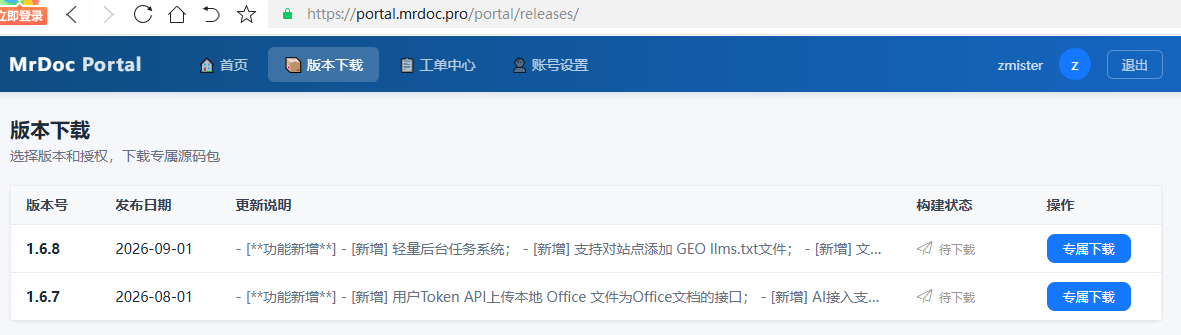 **2. Download the specified version** Select the latest version and click "Exclusive Download" to build and download the authorized source package. 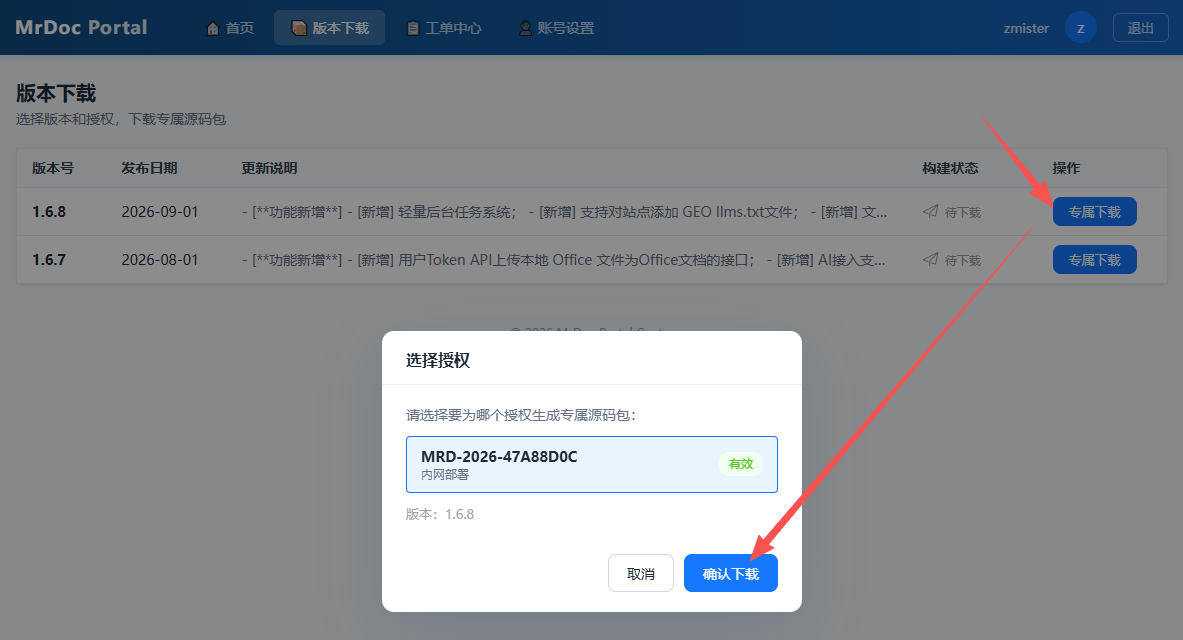 **3. Upload the source package** Upload the downloaded version source package to the server. (Image to be added) **4. Extract the source package** Complete the extraction of the uploaded source package. (Image to be added) **5. Stop and delete the old container** Stop the running old MrDoc Docker container. ```shell docker stop mrdoc ``` > i ⚠️ Deleting the Docker container will not delete MrDoc's source code, configuration, or media files. Delete the old MrDoc Docker container. ```shell docker rm mrdoc ``` (Image to be added) **6. Copy the data and configuration directories** >i ⚠️ Only copy the media and config directories; do not overwrite other program files in the new version. Copy the `media` and `config` directories from the old MrDoc directory to the new MrDoc directory, overwriting the directories with the same names in the new version. ``` Old version /opt/MrDocPro-v1.6.7/ ├── media/ └── config/ ↓ Copy New version /opt/MrDocPro-v1.6.8/ ├── media/ └── config/ ``` (Image to be added) **7. Create a new Docker container** ```shell docker run -d --name mrdoc --restart always -p 10086:10086 -v /opt/MrDocPro-v1.6.8:/app/MrDoc zmister/mrdoc:v9.6 ``` (Image to be added) ## 3. Native Python deployment update ```bash # 1) Back up the old version source directory (including config/ and media/, can roll back at any time) cp -r /opt/MrDocPro /opt/MrDocPro_bak_$(date +%Y%m%d) # 2) Download the new source package and extract it unzip MrDocPro_vX.Y.Z.zip -d /opt/MrDocPro_new # 3) Stop the Web service (execute according to your startup method) # 4) Copy the old version's config/ and media/ to the new version directory, overwriting the default directories in the package cp -r /opt/MrDocPro/config /opt/MrDocPro_new/ cp -r /opt/MrDocPro/media /opt/MrDocPro_new/ # 5) Enter the new version directory, install dependencies, and perform migration cd /opt/MrDocPro_new pip install -r requirements.txt python manage.py makemigrations python manage.py migrate python manage.py rebuild_index # 6) Restart the Web service (uwsgi / gunicorn / supervisor, etc., according to your startup method) ``` ## 4. Post-update verification 1. Visit the site and confirm the page opens normally; 2. Enter "Admin" and confirm the version number has been updated; ## 5. Notes - The original method of pulling code from the Git repository is no longer supported; - Scripts such as `docker-update.sh` also depend on Git and are no longer applicable to source package delivery; please ignore them; - **If you use a non-default database (MySQL, PostgreSQL, etc.)**: the SQLite backup method does not apply; use the database's own tools to back up separately, for example: - MySQL: `mysqldump -u username -p database_name > backup.sql` - PostgreSQL: `pg_dump -U username database_name > backup.sql` - **Rollback method**: if the new version runs abnormally, stop the new container and restart using the backup directory from step 1 (or copy `config/` and `media/` back to the old version directory and restart the old container); - If a 500 error occurs after updating, first check the error logs in the `log/` directory; - For cross-major-version upgrades (such as 1.x → 2.x), please contact the service provider for the corresponding migration instructions.
mrdoc
Sept. 29, 2026, 2:56 p.m.
Forward
Favorites
Last
Next
Scan the QR Code
Copy link
Scan the QR code to share.
Copy link
share
link
type
password
Update password
Validity period
Markdown file
Word document
PDF document (print)