MrDoc Deployment Guide
Simple Run
Deployment guide
Deploy MrDoc with Docker (recommended)
Docker image deployment
Deploy with Docker Compose
Manage Docker containers
Deploy MrDoc on Linux
Deploy MrDoc with Nginx + uWSGI
One-click deployment script (no longer maintained)
Baota Panel "Python Project Manager 1.9" deployment
Official Docker image deployment
Deploy MrDoc on Windows
Deploy with Waitress
Windows deployment panel
NAS deployment
Deploying on Zspace NAS
Feiniu FnOS deployment
Update upgrade notes - Open Source Edition
Update upgrade notes - Pro edition
System dependency library description
Migrating native deployment to Docker deployment
Configuration guide
Custom database configuration
Configure PDF generation for collections
Full-text search configuration
Using MySQL database with Docker
Configuring MySQL database to support emoji
Host static file resources with Nginx
Enable SSL with Nginx / Set up HTTPS
Configure reverse proxy/bind domain with Nginx
Nginx handling local video playback
Custom uWSGI configuration
Configuration file description
Data security
Site data backup/site migration
Professional data export and import
Open source data export and import
Data migration from open source to professional edition
Frequently asked questions
What to do if SQLite3 version error occurs?
What if the admin forgets the password?
Error: SyntaxError: invalid syntax
MySQLdb._exceptions.OperationalError: (1366, "Incorrect string value:")
Baota Panel "Python Project Manager" virtual environment usage issues.
View logs/log storage location
403 errors on POST/PUT requests for login, publish, upload, and edit under Nginx/HTTPS
What if I can't access the backend after switching the default login method?
Troubleshooting
Tip sponsorship records
MrDoc deployment server configuration recommendations
Powered by MrDoc Pro
-
+
home
Using MySQL database with Docker
# Using MySQL Database under Docker Within a Docker container, the host machine's MySQL service cannot be accessed via the local address `127.0.0.1`. If you need to use a MySQL database within Docker, there are two methods as follows. ## Method 1: Via the MySQL External Connection Address 1. Configure MySQL to allow external connections: ``` grant all privileges on *.* to 数据库用户名@'%' identified by '数据库密码' with grant option; flush privileges; ``` 2. In the [MrDoc configuration file](https://doc.mrdoc.pro/doc/3990/), fill in the MySQL database's external connection address at the database address field `host`. ## Method 2: Via the Docker Virtual Network Interface Address 1. View the Docker virtual network interface IP address 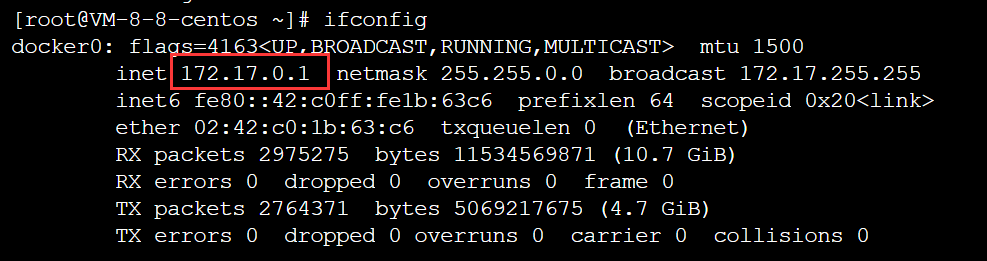 2. In the [MrDoc configuration file](https://doc.mrdoc.pro/doc/3990/), fill in the above Docker virtual network interface IP address at the database address field `host`. 3. Configure MySQL to allow access from the Docker virtual network interface IP address: ``` grant all privileges on *.* to 数据库用户名@'虚拟网卡地址' identified by '数据库密码' with grant option; flush privileges; ``` ## MySQL 8.0 Operation Method MySQL 8.0 does not support the above command operations. You can refer to https://blog.csdn.net/java_cai_niao_han/article/details/110442608 for configuration.
mrdoc
Sept. 29, 2026, 6:34 p.m.
Forward
Favorites
Last
Next
Scan the QR Code
Copy link
Scan the QR code to share.
Copy link
share
link
type
password
Update password
Validity period
Markdown file
Word document
PDF document (print)