MrDoc User Manual
🎊 Basic Concepts
📑 Collection Feature
Document Sorting (Drag & Drop)
Document Watermark
Collection Permissions
Export as PDF / EPUB / Word
Collaboration & Members
Collection Info & Settings
Export Collection
Document Access Log
Pin Collection
Disable Document Copying
Transfer Collection
Collection Sharing
Enable Document Comments
WebHook Delivery
Hide Collection on Homepage
Collection Association Set
Tabs Configuration
Content Table Sorting
📄 Document Features
Subdocument Control
Sort Documents
Set Document Level
Document Sharing
Copy / Move Document
Document Permissions
Document Versions
Document Download
Export Markdown
Export as PDF
Export as Excel
Document Attachments
Transfer Document
Directory Display
Create Shortcut
Insert Video
Document Tags
Auto-Save
🗄️ Asset Management
Upload Size Limit
Allowed Image Formats
Allowed Attachment Formats
Attachment Preview
Transfer Attachments / Images
Image Cleanup
🎯 Import and Export
Desktop Import
Import from Joplin
Import from Evernote
Web Import
CLI Import
🔑 Third-Party Login
DingTalk Login
WeChat Work Auth
LDAP Integration
OIDC Integration
WeChat OAuth
📦 Third-Party Storage
MinIO
Qiniu OSS
Aliyun OSS
AWS S3
🤖AI Integration
Basic Configuration
Dify Integration
📝OnlyOffice Integration
📊 Drawio Integration
⚓ Site Management
Site Info
Homepage Template
Users & Accounts
Tracking Code
Ads / Info Block / Custom Head
Disable Update Check
Search Mode
Image Thumbnails in Docs
Feedback
RSS
Single Tag Settings
Email Sender
Site Data Export
Editor Settings
🧑 Personal Account
Default Editor
User Nickname
Change Password
Bind Third-Party Account
🎈 User Token API
Get User Token
List Collections
Get Collection Catalog
Get Collection Documents
Get Personal Documents
Get Document Content
Create Collection
Create Document
Update Document
Upload Image
Verify Token
🖥️ Client
💻 Desktop
📱 Mobile
🌐 Browser Extension
⌨️Obsidian Plugins
Common Issues Index
Powered by MrDoc Pro
-
+
home
Ads / Info Block / Custom Head
MrDoc supports the insertion of custom **text, HTML, CSS, and JavaScript** content on pages such as the homepage, collections, and document browsing pages. If you have specific requirements for site styling, you can address them here. ## Configuration Path Configuration Path: Admin Panel → Site Settings → Basic Settings → Ad Slots & Analytics Code, as shown in the figure below: 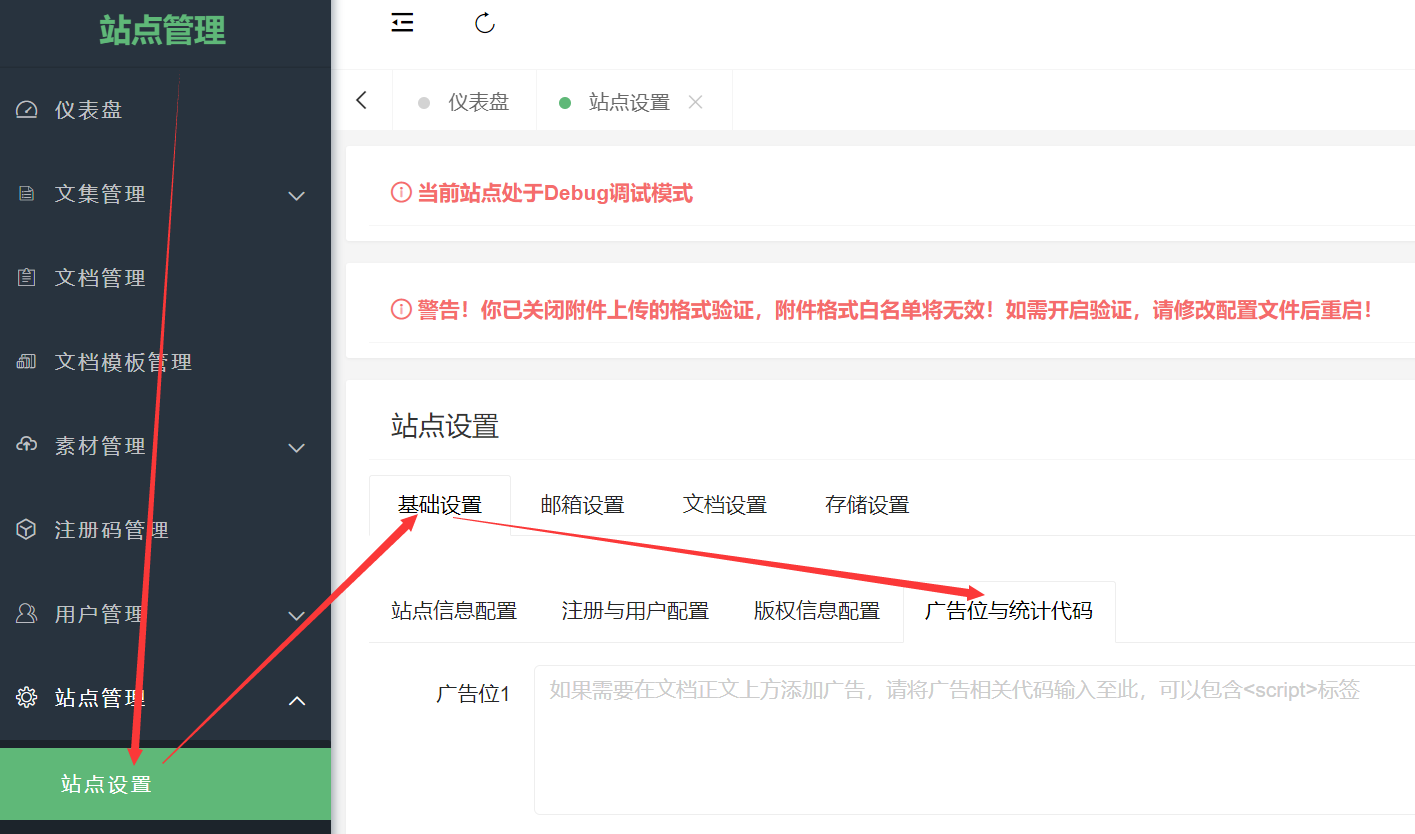 ### Custom Head You can customize the Head code for the homepage, collection pages, and document pages. For example, this site uses a custom Head to set the document font to "LXGW Wenkai Screen" on document pages: ```html <script type="text/javascript" charset="UTF-8" src="https://cdn.wwads.cn/js/makemoney.js" async></script> <link rel="stylesheet" href="https://npm.elemecdn.com/lxgw-wenkai-screen-webfont/style.css" media="print" onload="this.media='all'"> <style> .markdown-body,.project-toc-left a{ font-family: "LXGW Wenkai Screen","Microsoft YaHei", Helvetica, "Meiryo UI", "Malgun Gothic", "Segoe UI", "Trebuchet MS", "Monaco", monospace, Tahoma, STXihei, "华文细黑", STHeiti, "Helvetica Neue", "Droid Sans", "wenquanyi micro hei", FreeSans, Arimo, Arial, SimSun, "宋体", Heiti, "黑体", sans-serif; } </style> ``` ### Analytics Code If your site needs to integrate external analytics codes, such as Baidu Analytics, 51la, Google Analytics, etc., you can add the analytics code to the "Analytics Code" input box. ### Information Ad Blocks MrDoc has built-in four information blocks on collection pages and document pages, located at: - The area between the title and the main content; - The area between the main content and the document information; - The area below the collection name and above the collection outline on the left sidebar; - The area below the collection outline on the left sidebar;
mrdoc
Nov. 18, 2025, 4:20 p.m.
Forward
Favorites
Last
Next
Scan the QR Code
Copy link
Scan the QR code to share.
Copy link
Markdown file
Word document
PDF document
PDF document (print)
share
link
type
password
Update password
Validity period